

GET STARTED ->
API Endpoint
	https://apiv2.system-area.mn/api
SWAGGER REQUEST TESTING
	https://apiv2.system-area.mn/docs
This web app is intended to connect to our organization's fullfillment system and works in the following basic order.
Depending on the nature of the organization, changes can be made to common solutions.
If you would like to use our fullfillment API, please contact us. Thank you.
Contact number: (+976) 99011084, (+976) 99293338
0. API Standard ->
Request JSON standart :

{
   "Version":"SampleVersion",
   "FunctionID":"SampleFunctionName",
   "JObject":{
      "SampleField1":""
   }
}

Result JSON standart :

{
    "success": true,
    "message": "",
    "errordesc": null,
    "errorcode": 0,
    "data": {
        "AnyJsonStructures": ""
    }
}
All operations, except 'Login' to the API, exchange data according to a common standard.
https://apiv2.system-area.mn/api/callfunction
REQUEST STANDART
When sending any data, send the data within the JObject field according to the function description.
JSON PARAMETERS
| Field | Type | Description |
|---|---|---|
| Version | String | Version of the function being called |
| FunctionID | String | The name of the function being called |
| JObject | String | The value specified in the description of the function (optional) |
RESPONSE STANDART
The response to the request is the same for all values except the Data field.
The return value in the Data field varies depending on the function.
JSON RESULTS
| Field | Type | Description |
|---|---|---|
| success | bool | If the function works correctly, it returns "true"; otherwise, it returns "false" |
| message | String | An explanation of the success message of the function being called |
| errordesc | String | If success = false, it is an error message of the function being called |
| errorcode | int | Error number |
| data | JObject | The response value specified in the function definition |
1. Request a Token ->
METHOD : POST
curl POST 'https://apiv2.system-area.mn/api/account/login' \
--header 'Content-Type: application/json' \
--data-raw '{
  "ApiKey": "xxxx",
  "UserName": "xxxx",
  "Password": "xxxx"
}'
To connect API, use the name, password, and API key provided by our organization.:
https://apiv2.system-area.mn/api/account/login
Request JSON sample :

{
  "ApiKey": "xxx",
  "UserName": "xxx",
  "Password": "xxx"
}

Result JSON sample :

{
    "success": true,
    "message": "",
    "errordesc": null,
    "errorcode": 0,
    "data": {
        "token": "JWT Token"
    }
}
JSON PARAMETERS
| Field | Type | Description |
|---|---|---|
| ApiKey | String | API Key provided by the System-Area |
| UserName | String | Organization's username provided by the System-Area |
| Password | String | Organization's password provided by the System-Area |
Delivery Service ->
API Endpoint
	https://apiv2.system-area.mn/api
It will only be used to create a delivery order and will only be generated if the delivery is confirmed.
The delivery order will not be removed or edited once it has been delivered to the warehouse by itself or by the delivery staff.
2. Delivery address information ->
METHOD : POST
curl POST 'https://apiv2.system-area.mn/api/CallFunction' \
--header 'Authorization: Bearer JWT' \
--header 'Content-Type: application/json' \
--data-raw '{
  "Version": "1.0.0",
  "FunctionID": "FN_100"
}'
Delivery address information is obtained through the following functions, and price information for delivery to the region is also used by this service.
https://apiv2.system-area.mn/api/callfunction
Request JSON sample :

{
  "Version": "1.0.0",
  "FunctionID": "FN_100"
}

Result JSON sample :

{
    "success": true,
    "message": "",
    "errordesc": null,
    "errorcode": 0,
    "data": {
        "Address": [
            {
                "Oid": "E4BBFE25-2320-4B75-8CF1-BD2D004297A5",
                "Code": "110",
                "DistrictName": "Баянгол",
                "KhorooName": "14-р хороо",
                "FullAddress": "(110),Улаанбаатар,Баянгол,14-р хороо",
                "Zone": "A",
                "Price": [
                    {
                        "Code": 0,
                        "SizeDescr": "Жижиг",
                        "Amount": 5000
                    },
                    {
                        "Code": 1,
                        "SizeDescr": "Дунд",
                        "Amount": 7000
                    },
                    {
                        "Code": 2,
                        "SizeDescr": "Том",
                        "Amount": 10000
                    }
                ]
            },
            {
                "Oid": "176DF956-9788-4322-A5DF-30AA4C183DAC",
                "Code": "110",
                "DistrictName": "Сонгинохайрхан",
                "KhorooName": "10-р хороо",
                "FullAddress": "(110),Улаанбаатар,Сонгинохайрхан,10-р хороо",
                "Zone": "A",
                "Price": [
                    {
                        "Code": 0,
                        "SizeDescr": "Жижиг",
                        "Amount": 5000
                    },
                    {
                        "Code": 1,
                        "SizeDescr": "Дунд",
                        "Amount": 7000
                    }
                ]
            }
        ]
    }
}
JSON PARAMETERS
| Field | Type | Description |
|---|---|---|
| Version | String | "1.0.0" |
| FunctionID | String | "FN_100" |
JSON RESULTS
| Field | Type | Description |
|---|---|---|
| success | bool | If the function works correctly, it returns "true"; otherwise, it returns "false" |
| message | String | An explanation of the success message of the function being called |
| errordesc | String | If success = false, it is an error message of the function being called |
| errorcode | int | Error number |
| data | JObject |
Address - Address list -Address[n].Oid - Address unique number -Address[n].Code - Address internal code -Address[n].DistrictName - Name of the district -Address[n].KhorooName - Name of the Khoroo -Address[n].FullAddress - Detailed address discription -Address[n].Zone - Zone --Address[n].Price - Delivery price at the address ---Address[n].Price[n].Code - Parcel size code ---Address[n].Price[n].SizeDescr - Explanation of the size of the parcel ---Address[n].Price[n].Amount - The price of delivery of a package of a certain size |
3. Delivery Order ->
METHOD : POST
curl --location --request POST 'https://apiv2.system-area.mn/api/CallFunction' \
--header 'Authorization: Bearer JWT' \
--header 'Content-Type: application/json' \
--data-raw '{
   "Version":"1.0.0",
   "FunctionID":"FN_101",
   "JObject":{
      "OrderNo":"",
      "RowStatus":"I",
      "Type":"1",
      "Size":0,
      "AddressOid":"CF569A26-B228-4A82-AB71-03639437E454",
      "LastName":"LastName",
      "FirstName":"FirstName",
      "Phone1":"98568799",
      "Phone2":"98568799",
      "AdditionalInfo":"111111",
      "Price":10000,
      "ItemCode":"SHIPMENT01",
      "Qty":2
   }
}'
Delivery orders are created by the following services
A single request is considered a single delivery.
Note : If 5 parcels are to be delivered, bundle them into one delivery order.
https://apiv2.system-area.mn/api/callfunction
Request JSON sample :

{
   "Version":"1.0.0",
   "FunctionID":"FN_101",
   "JObject":{
      "OrderNo":"",
      "RowStatus":"I",
      "Type":"1",
      "Size":0,
      "AddressOid":"CF569A26-B228-4A82-AB71-03639437E454",
      "LastName":"LastName",
      "FirstName":"FirstName",
      "Phone1":"98568799",
      "Phone2":"98568799",
      "AdditionalInfo":"111111",
      "Price":10000,
      "ItemCode":"SHIPMENT01",
      "Qty":2
   }
}

Result JSON sample :

{
    "success": true,
    "message": "",
    "errordesc": null,
    "errorcode": 0,
    "data": {
        "Order": {
            "OrderNo": "600-0035-036"
        }
    }
}
JSON PARAMETERS
| Field | Type | Description |
|---|---|---|
| Version | String | "1.0.0" |
| FunctionID | String | "FN_101" |
| JObject | JObject |
OrderNo - (Readonly) Order number generated by the system. Order number that needs to be updated or deleted from the delivery. You do not need to fill in the value if you are creating a new order delivery RowStatus - Request type. --If you are creating a new order = "I" --If the order is being updated = "U" --If the order is deleted = "D" Type - Delivery type. --simple delivery = "1" --When placing a parcel in a warehouse = "2" Size - Parcel size code. Note: Address[n].Price[n].Code field needs to be fill. AddressOid - Parcel delivery address by Oid. Note: Address[n].Oid field needs to be fill LastName - Receiver's Last Name FirstName - Receiver's Firs tname Phone1 - Receiver's primary phone number Phone2 - Receiver's secondary phone number AdditionalInfo - Receiver's detailed address discription Price - Parcel delivery price Address[n].Price[n].Amount Fill in the field data. ItemCode - Parcel Code The data in this field cannot overlap and there is an internal code in the connected system! Qty - Parcel quantity For example: if one shoe and two socks are needed to be delivered, Qty=3. |
JSON RESULTS
| Field | Type | Description |
|---|---|---|
| success | bool | If the function works correctly, it returns "true"; otherwise, it returns "false" |
| message | String | An explanation of the success message of the function being called |
| errordesc | String | If success = false, it is an error message of the function being called |
| errorcode | int | Error number |
| data | JObject | Order.OrderNo - Order number created on the system |
4. Tracking Delivery ->
METHOD : POST
curl POST 'https://apiv2.system-area.mn/api/CallFunction' \
--header 'Authorization: Bearer JWT' \
--header 'Content-Type: application/json' \
--data-raw '{
  "Version": "1.0.0",
  "FunctionID": "FN_102"
}'
Current delivery status information is obtained by the following function by OrderNo
https://apiv2.system-area.mn/api/callfunction
Request JSON sample :

{
   "Version":"1.0.0",
   "FunctionID":"FN_102",
   "JObject":{
      "OrderNo":""
   }
}

Result JSON sample :

{
  "success": true,
  "message": "",
  "errordesc": null,
  "errorcode": 0,
  "data": {
    "Order": [
      {
        "OrderNo": "600-0035-182",
        "ItemCode": "2030000363436",
        "Qty": 2,
        "CreatedDate": "2022.01.04 17:06:36",
        "IsTake": true,
        "TakeDate": "2022.01.04 17:18:56",
        "Delivery": []
      },
      {
        "OrderNo": "600-0035-183",
        "ItemCode": "2020000363941",
        "Qty": 1,
        "CreatedDate": "2022.01.04 17:07:08",
        "IsTake": true,
        "TakeDate": "2022.01.04 17:18:56",
        "Delivery": [
          {
            "RegDate": "2022.01.04 17:26:01",
            "StatusValue": 4,
            "StatusName": "Хүргэлтийг цуглуулж байна"
          },
          {
            "RegDate": "2022.01.04 17:26:33",
            "StatusValue": 5,
            "StatusName": "Хүргэлтийн мэдээллийг шалгаж байна"
          },
          {
            "RegDate": "2022.01.04 17:26:43",
            "StatusValue": 7,
            "StatusName": "Хүргэлт хийгдэж байна"
          },
          {
            "RegDate": "2022.01.04 17:26:59",
            "StatusValue": 8,
            "StatusName": "Хүргэлт хийгдэж дууссан байна"
          }
        ]
      }
    ]
  }
}
JSON PARAMETERS
| Field | Type | Description |
|---|---|---|
| Version | String | "1.0.0" |
| FunctionID | String | "FN_102" |
| JObject | JObject |
OrderNo - Order number created on the system. Note: If this value is left blank, the total order status will be listed. If this value is filled in with OrderNo, the status of the order is listed. |
JSON RESULTS
| Field | Type | Description |
|---|---|---|
| success | bool | If the function works correctly, it returns "true"; otherwise, it returns "false" |
| message | String | An explanation of the success message of the function being called |
| errordesc | String | If success = false, it is an error message of the function being called |
| errorcode | int | Error number |
| data | JObject |
Order - Single parcel -Order[n].OrderNo - Order Number -Order[n].ItemCode - Parcel code -Order[n].Qty - Parcel quantity -Order[n].CreatedDate - Order created date -Order[n].IsTake - Whether the parcel was received from the sender -Order[n].TakeDate - Date of receipt of the parcel from the sender --Order[n].Delivery - Parcel delivery status ---Order[n].Delivery[n].RegDate - Delivery status change record ---Order[n].Delivery[n].StatusValue - Delivery Status code ---Order[n].Delivery[n].StatusName - Delivery Status name |
5. User Interface (Optional) ->
IMPORT Defaults

    https://apiv2.system-area.mn/css/DeliveryUIDefault.css
    https://apiv2.system-area.mn/js/DeliveryUIDefault.js

If you want to change the template being loaded,
import only JS file

    https://apiv2.system-area.mn/js/DeliveryUIDefault.js

After importing the above path, the basic KgbOrderInit function
 is called and the interface is displayed.

Example JS:
KgbOrderInit({
    Authorization: '',
    ContainerDivName: 'deliveryForm',
    FirstName: 'Дулмаа',
    LastName: 'Бат',
    Phone1: '99293338',
    Phone2: '99293339',
    AdditionalInfo: '',
    SubmitButtonText: 'Continue',
    SizeCode: 1,
    StatusChangeEvent: KgbOrder_StatusChanged
});

For the further operation is calculated by the interface itself,
 and each calculation response as follows.
The response function is declared to KgbOrderInit.
 StatusChangeEvent and responds to each event.


Example JS:
function KgbOrder_StatusChanged(KGBOrder) {
    console.log('KgbOrder_StatusChanged', KGBOrder);
}

The function below is to confirm the order after completing the delivery information.
Note: Please note that editing is not possible if confirmed!
When the function is complete, the response immediately invokes the function declared in StatusChangeEvent.

Example JS:
KGBConfirmOrder('@OrderNo');

The following function is a function to cancel the confirmed delivery information.
Note: Only confirmed orders will be canceled!

When the function is complete, the response immediately invokes the function declared in StatusChangeEvent.

Example JS:
KGBVoidOrder('@OrderNo');
Download Delivery HTML template
In this section, you can use ready-made delivery template HTML according to the example shown on the right,
which saves development time and cost.
An example image is shown below.
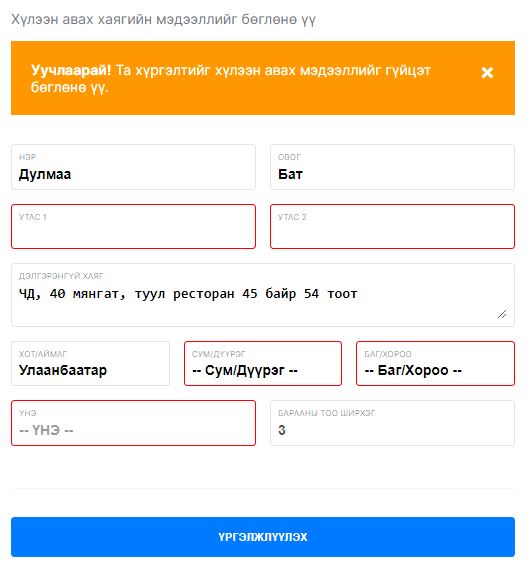
If the CSS of the template does not fit your system, you can use your own CSS template.
About KgbOrderInit function
| Field | Type | Description |
|---|---|---|
| Authorization | String | Json Web Token Generate using the name and password provided by System Area(Required) |
| ContainerDivName | String | The name of the div element that draws the model(Required) |
| SubmitButtonText | String | Text value of the button to confirm the delivery information(Required) |
| SizeCode | int |
The size of the Parcel to be delivered(Required)
SizeCode=0 - Small SizeCode=1 - Medium SizeCode=2 - Big |
| StatusChangeEvent | function(result){} |
A function that can be called at any time(Required) result.OrderNo The resulting order number result.Status Status Description of status result.Status=1 The model is called result.Status=2 The save button is pressed result.Status=3 Order confirmed (Unable to edit) result.Status=4 Order canceled (Unable to edit) |
| FirstName | String | Receiver's First Name (Optional) |
| LastName | String | Receiver's Last Name (Optional) |
| Phone1 | String | Receiver's primary phone number (Optional) |
| Phone2 | String | Receiver's secondary phone number (Optional) |
| AdditionalInfo | String | Receiver's detailed address discription (Optional) |
JSON RESULTS
| Field | Type | Description |
|---|---|---|
| success | bool | If the function works correctly, it returns "true"; otherwise, it returns "false" |
| message | String | An explanation of the success message of the function being called |
| errordesc | String | If success = false, it is an error message of the function being called |
| errorcode | int | Error number |
| data | JObject | null |
Warehouse Service ->
API Endpoint
	https://apiv2.system-area.mn/api
Энэ хэсэг нь агуулахад бараа байршуулах/fullfillment/ үед ашиглана.
Харилцагч болон компаний гэрээнд тусгасан шаардлага шалтшаануудаас тухай бүрт шалгалтууд өөр өөр байна.
6. Merchant Registration ->
METHOD : POST
curl --location --request POST 'https://apiv2.system-area.mn/api/CallFunction' \
--header 'Authorization: Bearer JWT' \
--header 'Content-Type: application/json' \
--data-raw '{
   "Version":"1.0.0",
   "FunctionID":"FN_200",
   "JObject":{
      "RowStatus":"I",
      "MerchantCode":"001",
      "MerchantType":"C",
      "RegNo":"0000038",
      "Name":"Нэр",
      "Contact":"Холбоо барих хүн",
      "Phone":"Холбоо барих утас",
      "Email":"Холбоо барих и-мэйл"
   }
}'
Холбогдсон систем нь өөр дээрээ нэг болон түүнээс олон харилцагчтай байх боломжтой бөгөөд тухай бүрт харилцагчийн мэдээллийг бүртгүүлнэ
https://apiv2.system-area.mn/api/callfunction
Request JSON sample :

{
   "Version":"1.0.0",
   "FunctionID":"FN_200",
   "JObject":{
      "RowStatus":"I",
      "MerchantCode":"001",
      "MerchantType":"C",
      "RegNo":"0000038",
      "Name":"Нэр",
      "Contact":"Холбоо барих хүн",
      "Phone":"Холбоо барих утас",
      "Email":"Холбоо барих и-мэйл"
   }
}

Result JSON sample :

{
    "success": true,
    "message": "",
    "errordesc": null,
    "errorcode": 0,
    "data": null
    }
}
JSON PARAMETERS
| Field | Type | Description |
|---|---|---|
| Version | String | "1.0.0" |
| FunctionID | String | "FN_200" |
| JObject | JObject |
RowStatus - Хүсэлтийн төрөл. --Захиалга шинээр үүсгэж байгаа бол = "I" --Захиалга засварлаж байгаа бол = "U" MerchantCode - Харилцагчийн код. Системийн хувьд дахин давхцахгүй утга байна MerchantType - Харилцагчийн төрөл. "C" - Байгууллага "P" - Хувь хүн RegNo - Харилцагчийн регистрийн дугаар. "MerchantType" : "C" бол байгууллагын регисрийн дугаар "MerchantType" : "P" бол хувь хүний регисрийн дугаар Name - Харилцагчийн нэр. Contact - Харилцагчийн холбоо барих хүний нэр Phone - Харилцагчийн холбоо барих хүний утасны дугаар Email - Харилцагчийн холбоо барих хүний и-мэйл хаяг |
JSON RESULTS
| Field | Type | Description |
|---|---|---|
| success | bool | If the function works correctly, it returns "true"; otherwise, it returns "false" |
| message | String | An explanation of the success message of the function being called |
| errordesc | String | If success = false, it is an error message of the function being called |
| errorcode | int | Error number |
| data | JObject | null |
7. Add Item ->
METHOD : POST
curl --location --request POST 'https://apiv2.system-area.mn/api/CallFunction' \
--header 'Authorization: Bearer JWT' \
--header 'Content-Type: application/json' \
--data-raw '{
   "Version":"1.0.0",
   "FunctionID":"FN_201",
   "JObject":{
      "RowStatus":"I",
      "MerchantCode":"001",
      "ItemCode":"Барааны код",
      "Name":"Барааны нэр",
      "NetWeight":130,
      "GrossWeight":145
   }
}'
Тухайн мерчант-д харгалзах барааг бүртгүүлнэ. MerchantCode,ItemCode талбарууд unique талбар байна
https://apiv2.system-area.mn/api/callfunction
Request JSON sample :

{
   "Version":"1.0.0",
   "FunctionID":"FN_201",
   "JObject":{
      "RowStatus":"I",
      "MerchantCode":"1",
      "ItemCode":"Барааны код",
      "Name":"Барааны нэр",
      "NetWeight":130,
      "GrossWeight":145
   }
}

Result JSON sample :

{
    "success": true,
    "message": "",
    "errordesc": null,
    "errorcode": 0,
    "data": null
    }
}
JSON PARAMETERS
| Field | Type | Description |
|---|---|---|
| Version | String | "1.0.0" |
| FunctionID | String | "FN_201" |
| JObject | JObject |
RowStatus --Бараа шинээр үүсгэж байгаа бол = "I" --Бараа засварлаж байгаа бол = "U" --Бараа устгаж байгаа бол = "D" MerchantCode - Харилцагчийн код ItemCode - Барааны код Name - Барааны нэр NetWeight - Барааны цэвэр жин (optional) GrossWeight - Барааны бохир жин (optional) |
JSON RESULTS
| Field | Type | Description |
|---|---|---|
| success | bool | If the function works correctly, it returns "true"; otherwise, it returns "false" |
| message | String | An explanation of the success message of the function being called |
| errordesc | String | If success = false, it is an error message of the function being called |
| errorcode | int | Error number |
| data | JObject | null |
7a. Add Item Unit ->
METHOD : POST
curl --location --request POST 'https://apiv2.system-area.mn/api/CallFunction' \
--header 'Authorization: Bearer JWT' \
--header 'Content-Type: application/json' \
--data-raw '{
   "Version":"1.0.0",
   "FunctionID":"FN_202",
   "JObject":{
      "RowStatus":"U",
      "MerchantCode":"1",
      "ItemCode":"Барааны код",
      "UnitCode":"BLACK-XL",
      "UnitName":"Жижиг",
      "BarCode":""
   }
}'
Тухайн мерчантийн бараанд харгалзах хэмжих нэгжийг бүртгүүлнэ. MerchantCode,ItemCode,UnitCode талбарууд unique талбар байна
Жишээ нь Цагаан цамц гэсэн бараа үндсэн бараагаар бүртгэсэн бол түүнд харгалзах размер өнгөөр ялган бүртгэх боломжтой
https://apiv2.system-area.mn/api/callfunction
Request JSON sample :

{
   "Version":"1.0.0",
   "FunctionID":"FN_202",
   "JObject":{
      "RowStatus":"U",
      "MerchantCode":"1",
      "ItemCode":"Барааны код",
      "UnitCode":"BLACK-XL",
      "UnitName":"Жижиг",
      "BarCode":""
   }
}

Result JSON sample :

{
    "success": true,
    "message": "",
    "errordesc": null,
    "errorcode": 0,
    "data": null
    }
}
JSON PARAMETERS
| Field | Type | Description |
|---|---|---|
| Version | String | "1.0.0" |
| FunctionID | String | "FN_201" |
| JObject | JObject |
RowStatus --Хэмжих нэгж шинээр үүсгэж байгаа бол = "I" --Хэмжих нэгж засварлаж байгаа бол = "U" --Хэмжих нэгж устгаж байгаа бол = "D" MerchantCode - Харилцагчийн код ItemCode - Барааны код Өмнө бүртгэсэн ItemCode UnitCode - Хэмжих нэгжийн код UnitName - Хэмжих нэгжийн нэр эсвэл тайлбар BarCode - Барааны бар код (optional) |
JSON RESULTS
| Field | Type | Description |
|---|---|---|
| success | bool | If the function works correctly, it returns "true"; otherwise, it returns "false" |
| message | String | An explanation of the success message of the function being called |
| errordesc | String | If success = false, it is an error message of the function being called |
| errorcode | int | Error number |
| data | JObject | null |
8. Placement Order By Merchant ->
METHOD : POST
curl --location --request POST 'https://apiv2.system-area.mn/api/CallFunction' \
--header 'Authorization: Bearer JWT' \
--header 'Content-Type: application/json' \
--data-raw '{
   "Version":"1.0.0",
   "FunctionID":"FN_203",
   "JObject":{
      "RowStatus":"I",
      "MerchantCode":"1",
      "OrderType":"CM",
      "Descr":"Descr",
      "Items":[
         {
            "RowStatus":"I",
            "ItemCode":"Барааны код",
            "UnitCode":"Барааны нэр",
            "ReceiveUnitQty":1,
            "ReceiveUnitPrice":2
         },
         {
            "RowStatus":"I",
            "ItemCode":"Барааны код",
            "UnitCode":"Барааны нэр",
            "ReceiveUnitQty":1,
            "ReceiveUnitPrice":2
         }
      ]
   }
}'
Энэ функцийг ашиглан мерчант болгоноор агуулахруу бараа буулгах хуваарийг үүсгэнэ.
Тухайн мерчантийн бараанд харгалзах ItemCode,UnitCode,ReceiveUnitQty,ReceiveUnitPrice талбаруудыг бөглөн явуулж захиалга үүсгэнэ
Ажмилттай үүссэний дараа ирсэн хариуг хадгалж авна уу!!!
https://apiv2.system-area.mn/api/callfunction
Request JSON sample :

{
   "Version":"1.0.0",
   "FunctionID":"FN_203",
   "JObject":{
      "RowStatus":"I",
      "MerchantCode":"1",
      "OrderType":"CM",
      "Descr":"Descr",
      "Items":[
         {
            "RowStatus":"I",
            "ItemCode":"Барааны код",
            "UnitCode":"Барааны нэр",
            "ReceiveUnitQty":1,
            "ReceiveUnitPrice":2
         },
         {
            "RowStatus":"I",
            "ItemCode":"Барааны код",
            "UnitCode":"Барааны нэр",
            "ReceiveUnitQty":1,
            "ReceiveUnitPrice":2
         }
      ]
   }
}

Result JSON sample :

{
  "success": true,
  "message": "",
  "errordesc": null,
  "errorcode": 0,
  "data": {
    "CreatedItems": [
      {
        "ShipSchdNo": "SS00000006",
        "Items": [
          {
            "ShipSchdItemID": 11,
            "MerchantCode": "1",
            "ItemCode": "Барааны код",
            "UnitCode": "Барааны нэр",
            "ReceiveUnitQty": 1,
            "ReceiveUnitPrice": 2
          },
          {
            "ShipSchdItemID": 12,
            "MerchantCode": "1",
            "ItemCode": "Барааны код",
            "UnitCode": "Барааны нэр",
            "ReceiveUnitQty": 1,
            "ReceiveUnitPrice": 2
          }
        ]
      }
    ]
  }
}
JSON PARAMETERS
| Field | Type | Description |
|---|---|---|
| Version | String | "1.0.0" |
| FunctionID | String | "FN_203" |
| JObject | JObject |
RowStatus --Шинээр үүсгэж байгаа бол = "I" --Засварлаж байгаа бол = "U" --Устгаж байгаа бол = "D" ShipSchdNo - Буулгах хуваарийн дугаар. Шинээр бүртгэж байгаа үед хоосон байна MerchantCode - Харилцагчийн код OrderType - Захиалгын төрөл. "CM" - Ирж авах "TO" - Өөрийн машинаар буулгах Descr - Тайлбар ReqDate - Захиалга биелэх огноо (optional), IF OrderType = "TO" THEN required ArriveDate - Захиалга биелэх цаг (optional) TransportNo - Тээврийн хэрэгслийн улсын дугаар (optional) -Items - Захиалсан бараанууд --Items[n].RowStatus --Шинээр үүсгэж байгаа бол = "I" --Засварлаж байгаа бол = "U" --Устгаж байгаа бол = "D" --Items[n].ItemCode - Харилцагчийн барааны код --Items[n].UnitCode - Харицлагчийн барааны хэмжих нэгж --Items[n].ReceiveUnitQty - Захиалсан барааны тоо --Items[n].ReceiveUnitPrice - Захиалсан барааны нэгж үнэ |
JSON RESULTS
| Field | Type | Description |
|---|---|---|
| success | bool | If the function works correctly, it returns "true"; otherwise, it returns "false" |
| message | String | An explanation of the success message of the function being called |
| errordesc | String | If success = false, it is an error message of the function being called |
| errorcode | int | Error number |
| data | JObject |
CreatedItems - Үүссэн багц буулгах хуваарь -CreatedItems.ShipSchdNo - Буулгах хуваарийн дугаар. Өөрийн бааз руу хадгална уу! -CreatedItems.Items - Багцад харгалзах бараанууд --CreatedItems.Items[n].ShipSchdItemID - Буулгах хуваарийн барааны мөрийн дугаар. Өөрийн бааз руу хадгална уу! --CreatedItems.Items[n].MerchantCode - Мерчантын код. --CreatedItems.Items[n].ItemCode - Барааны код. --CreatedItems.Items[n].UnitCode - Барааны хэмжих нэгжийн код. --CreatedItems.Items[n].ReceiveUnitQty - Захиалсан тоо. --CreatedItems.Items[n].ReceiveUnitPrice - Захиалсан үнэ. |
9. Delivery Order From Warehouse ->
METHOD : POST
curl --location --request POST 'https://apiv2.system-area.mn/api/CallFunction' \
--header 'Authorization: Bearer JWT' \
--header 'Content-Type: application/json' \
--data-raw '{
   "Version":"1.0.0",
   "FunctionID":"FN_204",
   "JObject":{
      "RowStatus":"I",
      "SONo": "",
      "MerchantCode":"1",
      "Descr":"Descr",
      "Recipient":{
         "Size":"1",
         "AddressOid":"AED758C6-F48B-46C4-B335-03C6755A2C68",
         "LastName":"Батаа",
         "FirstName":"Дулмаашдээ",
         "Phone1":"99887744",
         "Phone2":"88775544",
         "AdditionalInfo":"Алтаргана хотхон  3 дахв байр 12 дав  43 тоот орцны код #5544",
         "Price":1000
      },
      "Items":[
         {
            "RowStatus":"I",
            "ItemCode":"Барааны код",
            "UnitCode":"Барааны нэр",
            "UnitQty":1,
            "UnitPrice":2
         },
         {
            "RowStatus":"I",
            "ItemCode":"Барааны код",
            "UnitCode":"Барааны нэр",
            "UnitQty":1,
            "UnitPrice":2
         }
      ]
   }
}'
Тухайн худалдан авалт баталгаажсан бол энэ функцийг ашиглан хүргэлтийн захиалга үүгсэнэ
Тухайн бараанд харгалзах ItemCode,UnitCode,UnitQty,UnitPrice талбаруудыг бөглөн явуулж захиалга үүсгэнэ
Ажмилттай үүссэний дараа ирсэн хариуг хадгалж авна уу!!!
https://apiv2.system-area.mn/api/callfunction
Request JSON sample :

{
   "Version":"1.0.0",
   "FunctionID":"FN_204",
   "JObject":{
      "RowStatus":"I",
      "SONo": "",
      "MerchantCode":"1",
      "Descr":"Descr",
      "Recipient":{
         "Size":"1",
         "AddressOid":"AED758C6-F48B-46C4-B335-03C6755A2C68",
         "LastName":"Батаа",
         "FirstName":"Дулмаашдээ",
         "Phone1":"99887744",
         "Phone2":"88775544",
         "AdditionalInfo":"Алтаргана хотхон  3 дахв байр 12 дав  43 тоот орцны код #5544",
         "Price":1000
      },
      "Items":[
         {
            "RowStatus":"I",
            "ItemCode":"Барааны код",
            "UnitCode":"Барааны нэр",
            "UnitQty":1,
            "UnitPrice":2
         },
         {
            "RowStatus":"I",
            "ItemCode":"Барааны код",
            "UnitCode":"Барааны нэр",
            "UnitQty":1,
            "UnitPrice":2
         }
      ]
   }
}

Result JSON sample :

{
  "success": true,
  "message": "",
  "errordesc": null,
  "errorcode": 0,
  "data": {
    "CreatedItems": [
      {
        "SONo": "SO00000008",
        "Recipient": [
          {
            "Size": "1",
            "AddressOid": "AED758C6-F48B-46C4-B335-03C6755A2C68",
            "LastName": "Батаа",
            "FirstName": "Дулмаашдээ",
            "Phone1": "99887744",
            "Phone2": "88775544",
            "AdditionalInfo": "Алтаргана хотхон  3 дахв байр 12 дав  43 тоот орцны код #5544",
            "Price": 1000,
            "Items": [
              {
                "SOItemID": 14,
                "MerchantCode": "1",
                "ItemCode": "Барааны код",
                "UnitCode": "Барааны нэр",
                "UnitQty": 1,
                "UnitPrice": 2
              },
              {
                "SOItemID": 15,
                "MerchantCode": "1",
                "ItemCode": "Барааны код",
                "UnitCode": "Барааны нэр",
                "UnitQty": 1,
                "UnitPrice": 2
              }
            ]
          }
        ]
      }
    ]
  }
}
JSON PARAMETERS
| Field | Type | Description |
|---|---|---|
| Version | String | "1.0.0" |
| FunctionID | String | "FN_204" |
| JObject | JObject |
RowStatus --Шинээр үүсгэж байгаа бол = "I" --Засварлаж байгаа бол = "U" --Устгаж байгаа бол = "D" SONo - Хүргэлтийн захиалгын дугаар. Шинээр бүртгэж байгаа үед хоосон байна MerchantCode - Харилцагчийн код Descr - Тайлбар -Recipient - Хүлээн авагчийн мэдээлэл --Recipient.Size - Илгээмжийн үнийн код. Address[n].Price[n].Code талбар дээрх өгөгдлийг бөглөж явуулна. --Recipient.AddressOid - Илгээмжийн хүргэлтийн хаяг. Address[n].Oid талбар дээрх өгөгдлийг бөглөж явуулна. --Recipient.LastName - Хүлээн авагчийн овог. --Recipient.FirstName - Хүлээн авагчийн нэр. --Recipient.Phone1 - Хүлээн авагчийн утас1. --Recipient.Phone2 - Хүлээн авагчийн утас2. --Recipient.AdditionalInfo - Хүлээн авагчийн хаягийн дэлгэрэнгүй тайлбар. --Recipient.Price - Хүргэлтийн үнэ Address[n].Price[n].Amount талбар дээрх өгөгдлийг бөглөж явуулна. -Items - Захиалсан бараанууд --Items[n].RowStatus --Шинээр үүсгэж байгаа бол = "I" --Засварлаж байгаа бол = "U" --Устгаж байгаа бол = "D" --Items[n].ItemCode - Харилцагчийн барааны код --Items[n].UnitCode - Харицлагчийн барааны хэмжих нэгж --Items[n].UnitQty - Захиалсан барааны тоо --Items[n].UnitPrice - Захиалсан барааны нэгж үнэ |
JSON RESULTS
| Field | Type | Description |
|---|---|---|
| success | bool | If the function works correctly, it returns "true"; otherwise, it returns "false" |
| message | String | An explanation of the success message of the function being called |
| errordesc | String | If success = false, it is an error message of the function being called |
| errorcode | int | Error number |
| data | JObject |
CreatedItems - Үүссэн багц буулгах хуваарь -CreatedItems.SONo - Хүргэлтийн захиалгын дугаар. Өөрийн бааз руу хадгална уу! --CreatedItems.Recipient.Items[n].SOItemID - Захиалсан барааны мөрийн дугаар. Өөрийн бааз руу хадгална уу! Бусад мэдээлэл таны илгээсэн мэдээллийн манай сан дээрх өгөгдөл бөгөөд баталгаажуулах зорилготой болно |
10. Balance ->
METHOD : POST
curl --location --request POST 'https://apiv2.system-area.mn/api/CallFunction' \
--header 'Authorization: Bearer JWT' \
--header 'Content-Type: application/json' \
--data-raw '{
   "Version":"1.0.0",
   "FunctionID":"FN_300",
   "JObject":{
      "MerchantCode":"1",
      "ItemCode":"1",
      "UnitCode":"1"
   }
}'
Энэ функцийг ашиглан мерчант болгоноор агуулахад байгаа барааны үлдэгдлийг татна
MerchantCode заавал илгээх ба ItemCode,UnitCode талбарууд optional байна.
https://apiv2.system-area.mn/api/callfunction
Request JSON sample :

{
   "Version":"1.0.0",
   "FunctionID":"FN_300",
   "JObject":{
      "MerchantCode":"1",
      "ItemCode":"1",
      "UnitCode":"1"
   }
}

Result JSON sample :

{
  "success": true,
  "message": "",
  "errordesc": null,
  "errorcode": 0,
  "data": {
    "ItemBin": [
      {
        "MerchantCode": "1",
        "ItemCode": "ITEMCODE",
        "UnitCode": "UNITCODE",
        "Name": "Барааны нэр",
        "HandQty": 10,
        "AvailableQty": 8
      }
    ]
  }
}
JSON PARAMETERS
| Field | Type | Description |
|---|---|---|
| Version | String | "1.0.0" |
| FunctionID | String | "FN_300" |
| JObject | JObject |
MerchantCode - Харилцагчийн код ItemCode - Харилцагчийн барааны код /optional/ UnitCode - Харицлагчийн барааны хэмжих нэгж код /optional/ |
JSON RESULTS
| Field | Type | Description |
|---|---|---|
| success | bool | If the function works correctly, it returns "true"; otherwise, it returns "false" |
| message | String | An explanation of the success message of the function being called |
| errordesc | String | If success = false, it is an error message of the function being called |
| errorcode | int | Error number |
| data | JObject |
ItemBin - Барааны үлдэгдлийн жагсаалт -ItemBin[n].MerchantCode - Харилцгачийн код -ItemBin[n].ItemCode - Мерчантын код. -ItemBin[n].UnitCode - Барааны код. -ItemBin[n].Name - Барааны хэмжих нэгжийн код. -ItemBin[n].HandQty - Гар дээрх үлдэгдэл. -ItemBin[n].AvailableQty - Боломжит үлдэгдэл. |
11. Transaction history ->
METHOD : POST
curl --location --request POST 'https://apiv2.system-area.mn/api/CallFunction' \
--header 'Authorization: Bearer JWT' \
--header 'Content-Type: application/json' \
--data-raw '{
   "Version":"1.0.0",
   "FunctionID":"FN_301",
   "JObject":{
      "MerchantCode":"1",
      "BegDate":"2021.12.01",
      "EndDate":"2022.01.20",
      "ItemCode":"1",
      "UnitCode":"1"
   }
}'
Энэ функцийг ашиглан мерчант болгоноор тухайн барааны хөдөлгөөний түүхийг харуулна.
MerchantCode,BegDate,EndDate заавал илгээх ба ItemCode,UnitCode талбарууд optional байна.
BegDate - EndDate 90 хоног дотор хайлт хийнэ
https://apiv2.system-area.mn/api/callfunction
Request JSON sample :

{
   "Version":"1.0.0",
   "FunctionID":"FN_301",
   "JObject":{
      "MerchantCode":"1",
      "BegDate":"2021.12.01",
      "EndDate":"2022.01.20",
      "ItemCode":"1",
      "UnitCode":"1"
   }
}

Result JSON sample :

{
  "success": true,
  "message": "",
  "errordesc": null,
  "errorcode": 0,
  "data": {
    "TxnHist": [
      {
        "MerchantCode": "1",
        "ItemCode": "ITEMCODE",
        "UnitCode": "UNITCODE",
        "Name": "Барааны нэр",
        "UnitName": "Барааны нэр",
        "TxnDate":"2022.01.05",
        "TxnNo": "SO00000008",
        "TxnItemID": 1,
        "TxnType":"INWS",
        "TxnTypeName":"Орлого авах - Буулгах хуваариас",
        "UnitQty":10,
        "UnitAmt":15000,
        "UnitTotalAmt": 150000,
        "CreatedDate":"2022.01.05 19:01:12"
      }
    ]
  }
}
JSON PARAMETERS
| Field | Type | Description |
|---|---|---|
| Version | String | "1.0.0" |
| FunctionID | String | "FN_301" |
| JObject | JObject |
MerchantCode - Харилцагчийн код BegDate - Эхлэх огноо yyyy.MM.dd форматтай байна EndDate - Дуусах огноо yyyy.MM.dd форматтай байна ItemCode - Харилцагчийн барааны код /optional/ UnitCode - Харицлагчийн барааны хэмжих нэгж код /optional/ |
JSON RESULTS
| Field | Type | Description |
|---|---|---|
| success | bool | If the function works correctly, it returns "true"; otherwise, it returns "false" |
| message | String | An explanation of the success message of the function being called |
| errordesc | String | If success = false, it is an error message of the function being called |
| errorcode | int | Error number |
| data | JObject |
TxnHist - Барааны түүх жагсаалт -TxnHist[n].MerchantCode - Харилцгачийн код -TxnHist[n].ItemCode - Мерчантын код. -TxnHist[n].UnitCode - Барааны код. -TxnHist[n].Name - Барааны нэр. -TxnHist[n].UnitName - Барааны хэмжих нэгжийн нэр. -TxnHist[n].TxnDate - Гүйлгээ хийсэн огноо. -TxnHist[n].TxnNo - Гүйлгээний дугаар. -TxnHist[n].TxnItemID - Гүйлгээний мөрийн дугаар. -TxnHist[n].TxnType - Гүйлгээний төрлийн код. -TxnHist[n].TxnTypeName - Гүйлгээний төрлийн нэр. -TxnHist[n].UnitQty - Тоо. -TxnHist[n].UnitAmt - Нэгж үнэ. -TxnHist[n].UnitTotalAmt - Нийт үнэ. -TxnHist[n].UnitTotalAmt - Үүсгэсэн огноо. |
Errors ->
Илгээсэн хүсэлт болгон дээр дараах алдаанууд ирэх боломжтой бөгөөд энэ нь HTTP.STATUSCODE = 200 үед биелнэ
| errorcode | Тайлбар |
|---|---|
| 0 | Алдаа гараагүй |
| 100 | Системийн алдаа. Энэ тохиолдолд систем админтай холбогдон шалгуулна. |
| 101 | Шалгуур хангаагүй алдаа 1 буюу Validation даваагүй алдаа. Энэ тохиолдолд мөн админаас асуух эсвэл гарын авлагыг дахин сайтар унших хэрэгтэй |
| 102 | Шалгуур хангаагүй алдаа 2 буюу Validation даваагүй алдаа. Энэ тохиолдолд мөн админаас асуух эсвэл гарын авлагыг дахин сайтар унших хэрэгтэй |